

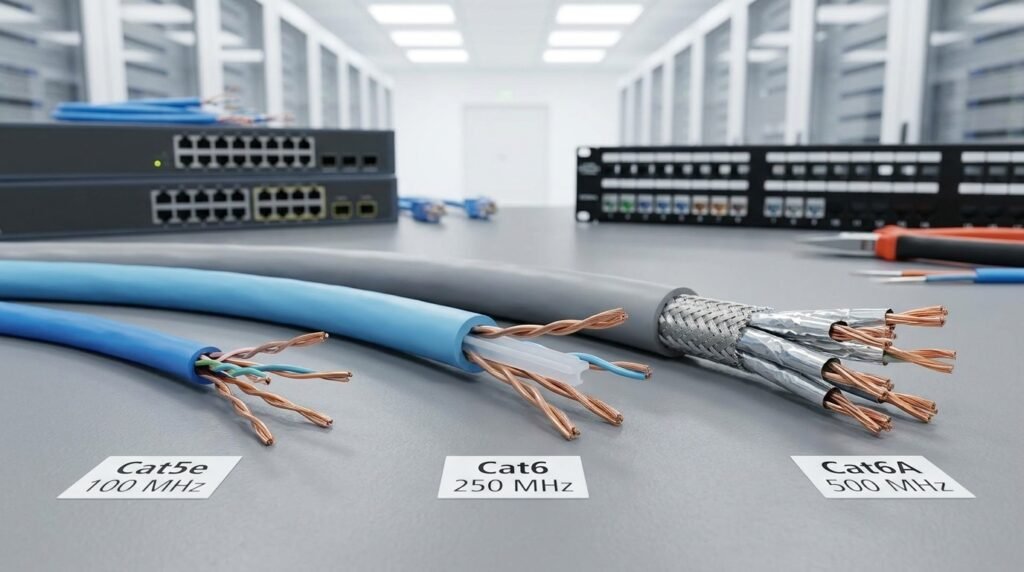
Choosing the right Ethernet cable can have a major impact on the performance, reliability, and long-term value of a network. Whether you are setting up a home office, upgrading a business network, installing security cameras, connecting wireless access points, or designing a larger commercial infrastructure, the cable category you choose matters.
Cat5e, Cat6, and Cat6A are among the most commonly used copper Ethernet cable categories in the United States. Although they may look similar from the outside, they are designed with different performance levels, bandwidth capabilities, construction requirements, and use cases.
For many basic networks, Cat5e can still provide dependable Gigabit Ethernet performance. Cat6 offers additional bandwidth and better performance against interference, making it a practical option for many modern installations. Cat6A goes further, providing the cabling performance required for 10 Gigabit Ethernet over a full 100-meter channel when the complete system is properly designed and installed.
The right choice depends on more than just the maximum speed printed on the cable. You should also consider installation distance, network equipment, Power over Ethernet requirements, cable pathways, electromagnetic interference, future upgrades, installation practices, and applicable U.S. cabling standards.
This guide explains the differences between Cat5e, Cat6, and Cat6A and provides practical guidance for choosing the right Ethernet cable for U.S. homes, offices, commercial buildings, and network installations.
Quick Comparison: Cat5e vs Cat6 vs Cat6A
Before looking at the details, here is a simple comparison of the three cable categories.
| Feature | Cat5e | Cat6 | Cat6A |
| Maximum specified frequency | 100 MHz | 250 MHz | 500 MHz |
| Common Gigabit Ethernet support | Yes | Yes | Yes |
| 2.5GbE / 5GbE | Can support depending on installation | Supported | Supported |
| 10GbE | Not the standard choice | Limited by installation conditions | Designed for 10GbE |
| 10GbE at full 100 m | No | Not the preferred solution | Yes |
| Crosstalk performance | Standard | Improved | Significantly improved |
| Cable size | Usually smaller | Usually larger | Usually largest |
| Installation difficulty | Easier | Moderate | More demanding |
| Typical cost | Lowest | Mid-range | Highest |
| Best suited for | Basic networks | Modern general-purpose networks | High-performance and future-ready networks |
Cat5e operates at up to 100 MHz, Cat6 at up to 250 MHz, and Cat6A at up to 500 MHz. Industry references identify Cat6A as the copper category designed for 10GBASE-T over a 100-meter channel.
However, these numbers should not be interpreted as internet speed. Cable frequency and Ethernet data rate are related to transmission performance, but they are not the same measurement.
What Is Cat5e Ethernet Cable?
Cat5e, or Category 5e, is an enhanced version of Category 5 twisted-pair cabling. It became widely adopted for Gigabit Ethernet networks and remains common in homes, small businesses, and existing commercial installations.
A typical Cat5e cable contains four twisted pairs, giving a total of eight copper conductors. The twisting helps reduce interference between the individual pairs.
Cat5e is rated to 100 MHz and is commonly used with 1000BASE-T Gigabit Ethernet. Industry cabling references list Cat5e as supporting Gigabit Ethernet over standard channel distances.
For a home user with a Gigabit internet connection, Cat5e may be completely adequate if the existing installation is in good condition.
Advantages of Cat5e
The biggest advantage of Cat5e is simplicity.
It is generally:
- Affordable
- Easy to install
- Widely available
- Compatible with standard Ethernet equipment
- Suitable for Gigabit Ethernet
- Available in many patch-cable lengths
- Commonly used in existing networks
Cat5e can be a sensible option when the network requirements are modest and there is no immediate need for 10 Gigabit Ethernet.
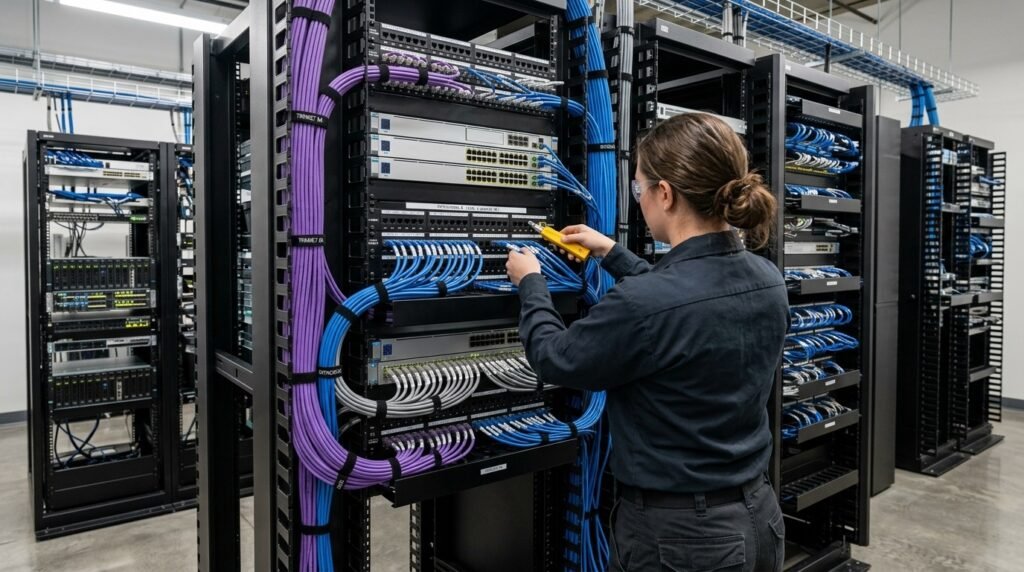
Limitations of Cat5e
The main limitation is its lower performance headroom compared with newer categories.
If you are installing new permanent cabling inside walls, ceilings, offices, or commercial spaces, you should consider whether the lower initial cost of Cat5e is worth giving up additional bandwidth and future upgrade flexibility.
Cat5e may also be less attractive for new installations where modern wireless access points, higher-speed network switches, servers, or other bandwidth-intensive equipment will be installed.
What Is Cat6 Ethernet Cable?
Cat6 is a higher-performance category designed to provide greater bandwidth and improved transmission characteristics compared with Cat5e.
Cat6 supports frequencies up to 250 MHz. It is widely used in residential and commercial networks and can support Gigabit Ethernet over standard channel distances. It also provides support for newer multi-gigabit Ethernet applications under appropriate conditions.
One of the important differences between Cat5e and Cat6 is the additional performance margin provided by the cable design.
Cat6 commonly uses more controlled pair geometry and may include a separator or spline between the twisted pairs. The exact construction varies by manufacturer.
Why Choose Cat6?
Cat6 can be a practical middle ground.
It provides:
- More bandwidth than Cat5e
- Better crosstalk performance
- Strong support for Gigabit Ethernet
- Compatibility with multi-gigabit applications
- A relatively reasonable installation cost
- Good flexibility for modern home and business networks
For someone building a new residential network but not requiring 10GbE across long cable runs, Cat6 can be an attractive choice.
Cat6 and 10 Gigabit Ethernet
This is where things become more complicated.
Cat6 can sometimes support 10GBASE-T over shorter distances, but it should not automatically be treated as a full-distance 10GbE solution.
Industry guidance explains that existing Category 6 systems may support 10GBASE-T depending on the installation and electromagnetic environment, but distance and alien-crosstalk conditions can affect performance. For a new installation intended to support 10GBASE-T up to 100 meters, Cat6A is the appropriate category to specify.
That distinction is important when planning a network.
What Is Cat6A Ethernet Cable?
Cat6A stands for Category 6 Augmented. It was developed to provide higher-performance twisted-pair cabling and support 10 Gigabit Ethernet over a full 100-meter channel.
Cat6A is rated to 500 MHz, twice the specified frequency of Cat6. It also has tighter requirements for controlling crosstalk, including alien crosstalk between adjacent cables.
Cat6A is commonly selected for:
- Data centers
- Server rooms
- Enterprise networks
- High-performance office networks
- Wireless access point infrastructure
- Security systems
- High-speed workstation connections
- New commercial structured cabling installations
Why Is Cat6A Larger?
One noticeable difference between Cat6A and Cat5e or Cat6 is physical size.
Cat6A cables can be thicker because manufacturers may use larger conductors, additional insulation, separators, or shielding.
This additional construction helps manage crosstalk and maintain signal integrity at higher frequencies.
The trade-off is that Cat6A can be harder to install in crowded conduits, cable trays, patch panels, and wall boxes.
Cat5e vs Cat6 vs Cat6A: Speed
Many people choose an Ethernet cable based only on speed.
That is understandable, but it is not the complete picture.
A network’s actual performance depends on several components:
- Ethernet standard
- Network interface
- Switch
- Router
- Cable category
- Cable length
- Connectors
- Patch panels
- Installation quality
- Electromagnetic environment
- Configuration
A Cat6A cable does not automatically make a network 10 Gbps.
Every major component in the network must support the desired Ethernet speed.
For example, if a computer has a 1GbE network interface, replacing its cable with Cat6A will not make that computer communicate at 10Gbps.
The cable is only one part of the complete network.
Understanding Gigabit Ethernet
Gigabit Ethernet, commonly associated with 1000BASE-T, can operate over Category 5e, Category 6, and Category 6A cabling under appropriate conditions.
This is why Cat5e remains useful.
If your router, switch, and computer all have Gigabit Ethernet ports, Cat5e can often provide the required physical connection.
However, choosing Cat6 or Cat6A during a new installation can provide additional performance headroom for future network upgrades.
What About 2.5GbE and 5GbE?
Modern networks are increasingly moving beyond traditional Gigabit Ethernet.
2.5GbE and 5GbE technologies can make better use of existing copper cabling without immediately requiring a complete replacement of the physical infrastructure.
Industry guidance notes that NBASE-T technologies were developed to provide 2.5 and 5 Gigabit speeds over installed Category 5e, Category 6, and Category 6A cabling, although actual support depends on the quality and characteristics of the installation.
This is especially relevant for:
- Modern Wi-Fi access points
- NAS devices
- High-performance desktops
- Small business servers
- Video production systems
- Network storage
- Multi-gigabit internet services
10 Gigabit Ethernet and Cat6A
10 Gigabit Ethernet, or 10GBASE-T, is one of the main reasons organizations choose Cat6A.
Cat6A is designed to support 10GBASE-T across a 100-meter twisted-pair channel when the cabling system meets the relevant requirements.
For new installations where 10GbE is a realistic requirement, Cat6A provides a more straightforward approach than trying to design around the limitations of lower categories.
The Importance of the 100-Meter Limit
Ethernet cabling specifications commonly use a maximum channel length of 100 meters, or approximately 328 feet.
This does not simply mean that you can purchase a 100-meter cable and connect two devices.
A structured cabling channel can include:
- Permanent horizontal cable
- Patch panels
- Work-area patch cords
- Equipment patch cords
- Connecting hardware
The complete channel needs to be considered when planning cable distances.
For 10GBASE-T, a Category 6A channel should not exceed 100 meters according to industry cabling guidance.
If your network requires a longer distance, fiber optic cabling may be more appropriate.
Crosstalk: Why Cable Construction Matters
Crosstalk occurs when signals from one pair interfere with another pair.
As network frequencies increase, controlling crosstalk becomes increasingly important.
There are two broad concerns:
Internal Crosstalk
This occurs between pairs within the same cable.
Alien Crosstalk
This occurs between neighboring cables.
Alien crosstalk becomes particularly important for high-speed applications such as 10GBASE-T.
Cat6A has more stringent performance requirements designed to address these issues. Testing requirements for 10GBASE-T include measurements related to alien crosstalk.
This is one reason Cat6A cables can have larger physical dimensions and more sophisticated construction.
Solid-Core vs Stranded Ethernet Cable
Another important decision is whether you need solid or stranded cable.
Solid-Core Cable
Solid conductor cable uses a single solid copper conductor for each wire.
It is generally intended for permanent installations such as:
- Walls
- Ceilings
- Cable trays
- Patch panels
- Structured cabling
Solid cable is commonly used for horizontal cabling.
Stranded Cable
Stranded cable uses multiple smaller strands within each conductor.
It is more flexible and is commonly used for patch cords.
For example, a short cable running from a wall outlet to a computer is often a stranded patch cable.
The two types serve different purposes, so choosing the correct construction is important.
UTP vs Shielded Ethernet Cable
Ethernet cables can also be designed with different shielding configurations.
Unshielded twisted pair, or UTP, is common in many residential and commercial installations.
Shielded designs can provide additional protection against electromagnetic interference when correctly installed as part of a compatible system.
Shielded cable may be considered in environments such as:
- Industrial facilities
- Manufacturing areas
- Locations with significant electrical equipment
- High-interference environments
- Certain data center installations
However, shielding is not automatically better for every installation.
A shielded system needs appropriate compatible components and proper grounding/bonding practices.
Cat6A and Power over Ethernet
Power over Ethernet, or PoE, allows compatible network devices to receive electrical power through Ethernet cabling.
PoE is commonly used for:
- Wireless access points
- IP cameras
- VoIP phones
- Sensors
- Building automation devices
- Other network-connected equipment
As PoE power levels increase, cable selection and installation practices become increasingly important.
Cat6A can be useful in higher-performance PoE environments because its larger physical construction can provide additional thermal performance and installation headroom depending on the cable design.
However, PoE compatibility should always be confirmed using the specifications of the actual cable and networking equipment.
Cat6A for Wireless Access Points
Modern Wi-Fi systems can place significant demands on wired infrastructure.
A high-performance wireless access point may require more than a traditional 1GbE uplink.
If an organization is installing new wireless infrastructure, it may make sense to install higher-category cabling to avoid creating a bottleneck between the access point and network switch.
Cat6A can therefore be particularly useful for enterprise Wi-Fi deployments where multi-gigabit Ethernet is part of the design.
Ethernet Cable for IP Security Cameras
Security cameras are another common application for Ethernet cabling.
IP cameras often use PoE, allowing a single Ethernet cable to carry both network traffic and electrical power.
For basic cameras, Cat5e can often be sufficient.
For larger installations, higher-resolution cameras, longer-term infrastructure planning, or high-density PoE deployments, Cat6 or Cat6A may be considered.
The correct choice should account for camera bandwidth, cable distance, PoE requirements, installation environment, and future expansion.
Choosing Ethernet Cable for Home Networks
For a typical American home, the decision is often straightforward.
Cat5e
Consider Cat5e if:
- You already have it installed
- Your network is primarily Gigabit
- Cost is the main concern
- Cable runs are simple
- You do not expect major upgrades
Cat6
Consider Cat6 if:
- You are installing new cable
- You want more performance headroom
- You use multi-gigabit networking
- You want a balance between cost and capability
Cat6A
Consider Cat6A if:
- You want 10GbE capability
- You are wiring a new home for long-term use
- You have a home server or NAS
- You transfer large files frequently
- You want high-performance Wi-Fi infrastructure
- You are building a dedicated media or technology room
Choosing Ethernet Cable for a Business
Business networks usually require more planning than home networks.
A small office might operate comfortably with Cat6.
A larger organization with servers, high-speed wireless access points, network storage, and future 10GbE requirements may benefit from Cat6A.
In a commercial environment, the cost of the cable itself is only one part of the project.
Other costs may include:
- Labor
- Conduit
- Cable trays
- Patch panels
- Racks
- Jacks
- Faceplates
- Testing
- Documentation
- Future maintenance
Because labor can represent a significant portion of an installation, installing a higher category during initial construction may be worth considering when future upgrades are expected.
Cat5e vs Cat6 vs Cat6A: Cost Considerations
Cat5e is generally the least expensive option.
Cat6 typically costs more.
Cat6A can cost more again because of its larger construction and higher performance requirements.
But the cheapest cable is not necessarily the lowest-cost solution over the life of a building.
Imagine a company installs Cat5e today and later requires 10GbE across many workstations.
If the existing cabling cannot meet the new requirements, the organization may need to:
- Remove existing cable
- Purchase new cable
- Re-run cables
- Re-terminate connections
- Re-test links
- Re-document the installation
- Potentially disrupt business operations
For this reason, network planners should consider the expected lifetime of the infrastructure rather than only the initial cable price.
Physical Size and Installation Requirements
One of the practical disadvantages of Cat6A is its size.
Thicker cables can require:
- Larger pathways
- More rack space
- Larger bend radii
- Better cable management
- More careful termination
- More installation planning
A large bundle of Cat6A cables can occupy substantially more space than a comparable Cat5e installation.
Therefore, cable trays and conduits should be designed with the actual cable diameter and fill requirements in mind.
Installation Quality Matters
Even a high-category cable can perform poorly if it is installed incorrectly.
Common installation problems include:
- Excessive pulling force
- Tight bends
- Damaged cable jackets
- Untwisting pairs too far near terminations
- Poor connector installation
- Excessive cable tension
- Improper routing
- Poor patch-panel termination
- Mixing incompatible components
- Excessive cable compression
The category printed on the jacket does not guarantee that the finished link will pass certification.
The complete installed channel matters.
Testing Ethernet Cabling
Testing is especially important in commercial installations.
A cable can look perfectly fine while failing performance requirements because of termination errors, excessive crosstalk, poor connectors, or installation damage.
Field certification can test parameters such as:
- Insertion loss
- Return loss
- NEXT
- FEXT
- Propagation delay
- DC resistance
- Alien crosstalk for applicable installations
For 10GBASE-T installations, testing is particularly important because the higher data rate introduces additional performance requirements.
A professional installation should therefore be tested and documented rather than simply connected to a switch and assumed to work.
U.S. Cabling Requirements and Standards
When discussing Ethernet cabling in the United States, it is more appropriate to refer to the applicable U.S. structured-cabling standards rather than Australian cabling requirements.
ANSI/TIA standards are widely used as a reference for structured telecommunications cabling in U.S. installations.
For balanced twisted-pair cabling, ANSI/TIA-568.2-D is an important standard family covering requirements for copper cabling components and systems.
The specific requirements for a project can depend on the building type, installation environment, local code requirements, telecommunications design, and project specifications.
It is also important to distinguish between a cabling standard and an electrical or building code.
Ethernet cable installation may interact with requirements from organizations and authorities such as:
- ANSI/TIA
- NEC
- NFPA
- Local Authorities Having Jurisdiction (AHJs)
- Building officials
- Fire-code authorities
The National Electrical Code, or NEC, can be particularly relevant to how communications cables are installed in buildings. Cable jacket ratings, pathways, plenum spaces, riser spaces, firestopping, separation from other systems, and other installation conditions may be subject to applicable code requirements.
For this reason, simply choosing Cat6A does not mean an installation automatically complies with every U.S. requirement.
The installer should verify the current edition of the applicable codes and standards for the specific project location.
Plenum vs Riser Cable in the USA
One important consideration in U.S. commercial cabling is the environment through which the cable will be installed.
Two terms you may encounter are:
CMP — Plenum Cable
CMP-rated cable is designed for use in spaces where the applicable code requires a plenum-rated cable.
Plenum spaces can include certain areas used for environmental air circulation.
CMR — Riser Cable
CMR-rated cable is intended for vertical or riser applications where that rating is permitted.
The appropriate jacket rating depends on the actual installation environment and applicable code.
Using the wrong cable jacket can create a compliance problem even if the cable category itself is correct.
Therefore, U.S. installers should select both:
- The correct performance category, such as Cat6 or Cat6A
- The appropriate cable jacket/fire rating for the installation environment
Local requirements and the applicable NEC edition should always be checked before installation.
ANSI/TIA Standards and Ethernet Cabling
TIA standards help define the performance expectations of structured cabling systems.
For example, Cat5e, Cat6, and Cat6A are associated with different performance levels.
Industry references commonly identify:
- Cat5e — 100 MHz
- Cat6 — 250 MHz
- Cat6A — 500 MHz
They also distinguish Cat6A as the category designed for 10GBASE-T over a 100-meter channel.
The actual standard applicable to a project should be confirmed based on the project’s date, scope, building type, and specifications.
Should You Use Cat5e in a New U.S. Installation?
There is no single answer for every project.
Cat5e can still make sense when:
- The network is primarily Gigabit
- The project has strict budget limitations
- Existing infrastructure is being extended
- Future bandwidth requirements are modest
However, if you are installing permanent cabling that will remain inside walls or ceilings for many years, it is worth considering whether a higher category provides better long-term flexibility.
The decision should be based on expected network requirements rather than simply choosing the cheapest cable.
Should You Use Cat6?
Cat6 is often a practical choice for residential and small-to-medium business networks.
It provides more bandwidth than Cat5e without some of the physical and installation challenges associated with Cat6A.
For users who need Gigabit or multi-gigabit connectivity but do not require 10GbE across a full 100-meter channel, Cat6 can provide a useful balance.
Should You Use Cat6A?
Cat6A becomes particularly relevant when 10GbE is part of the network design.
It is also attractive for new commercial installations where the cable is expected to remain in place for many years.
Cat6A provides the performance required for 10GBASE-T across a 100-meter channel when the complete system meets the relevant requirements.
It can also be useful for high-density wireless deployments and other environments where additional bandwidth and crosstalk performance are important.
What About “Cat6e”?
Be careful when shopping for Ethernet cable labeled “Cat6e.”
Cat6e is not the same thing as standardized Category 6A.
Industry guidance specifically warns that cables marketed as Cat6e should not automatically be treated as Cat6A products. If 10GBASE-T is required, the cable and connecting hardware should meet the appropriate Category 6A requirements.
When purchasing cable for a professional installation, look for clear category markings and appropriate compliance documentation rather than relying on marketing terminology.
Don’t Forget the Connectors
The cable is only one component of a structured cabling system.
You also need compatible:
- RJ45-style connecting hardware
- Keystone jacks
- Patch panels
- Patch cords
- Plugs
- Wall outlets
For higher-performance installations, all components should be appropriate for the target category.
Using high-performance cable with low-quality or mismatched connecting hardware can compromise the overall link.
A Category 6A installation should therefore be designed as a complete Category 6A system rather than simply buying Cat6A bulk cable.
Cable Pathways and Bend Radius
Cable routing is another important consideration.
Network cables should not be crushed, sharply bent, tightly bundled, or subjected to unnecessary mechanical stress.
Cat6A can be more demanding because of its larger diameter and construction.
During installation, cable pathways should provide sufficient room for:
- Current cable volume
- Future expansion
- Appropriate bends
- Termination space
- Maintenance access
Good cable management also makes troubleshooting and future upgrades easier.
Ethernet Cable and Electromagnetic Interference
Ethernet cable can be affected by electromagnetic interference from nearby electrical equipment.
Potential sources can include:
- Motors
- Transformers
- Fluorescent lighting equipment
- Industrial machinery
- Large electrical conductors
Proper routing and separation can help reduce interference.
In environments with significant interference, shielded cabling may be considered, but it should be installed as a complete compatible system.
For ordinary residential and office environments, properly installed UTP is often sufficient.
Future-Proofing Your Network
Future-proofing does not mean buying the most expensive cable available.
Instead, it means considering how the network may evolve.
Ask questions such as:
- Will internet speeds increase?
- Will the business add more employees?
- Will Wi-Fi equipment be upgraded?
- Will 10GbE become necessary?
- Will servers or NAS systems be added?
- Will PoE devices increase?
- Will cameras require more bandwidth?
- Will the building be difficult to re-cable later?
If the answer to several of these questions is yes, a higher-category cable may be worth considering.
Cat5e vs Cat6 vs Cat6A for Different Applications
Home Internet
Cat5e can be sufficient for many Gigabit home networks.
Cat6 is a useful choice for new installations where additional performance headroom is desired.
Cat6A makes more sense for users specifically planning 10GbE or advanced home networking.
Home Office
Cat6 is often suitable for a modern home office.
If the office includes a workstation, NAS, video-editing system, and 10GbE switch, Cat6A may be more appropriate.
Small Business
Cat6 can provide a practical balance for many small businesses.
Cat6A becomes more relevant where higher-speed servers, storage, or wireless infrastructure is involved.
Large Enterprise
Large enterprise projects may favor Cat6A for new horizontal copper installations where 10GbE and long-term infrastructure requirements justify it.
Data Centers
Data centers may use a combination of copper and fiber depending on distance, speed, rack design, and application.
Cat6A can be used for appropriate copper connections, while fiber may be selected for higher-speed or longer-distance links.
How Much Does Cable Category Affect Internet Speed?
This is a common misconception.
Your internet speed is not determined solely by the cable category.
Suppose your internet plan provides 500 Mbps.
Changing from Cat5e to Cat6A will not automatically increase the internet service to 10 Gbps.
The internet service, modem, router, switch, network adapter, and Ethernet link all need to support the desired speed.
Cable category becomes especially important when the internal network itself is operating at higher speeds.
Is Cat6A Worth the Extra Cost?
For every network? Not necessarily.
For a new installation expected to support 10GbE? It can be highly relevant.
For a simple home network with Gigabit equipment? The additional capability may not be necessary.
The decision should consider:
- Project budget
- Installation difficulty
- Required network speed
- Cable distance
- Expected equipment upgrades
- Building accessibility
- Future expansion
If replacing cable later would be extremely expensive, installing a higher-performance category from the beginning may be worth considering.
Common Mistakes When Buying Ethernet Cable
Several mistakes can cause problems.
Mistake 1: Choosing Based Only on Price
Cheap cable may not provide the required construction or compliance documentation.
Mistake 2: Assuming Cat6A Automatically Means 10Gbps
The network equipment must also support 10GbE.
Mistake 3: Ignoring Cable Length
Higher-speed Ethernet applications can be sensitive to installation distance and channel performance.
Mistake 4: Ignoring Connectors
The complete channel matters, not only the bulk cable.
Mistake 5: Using the Wrong Jacket Rating
In U.S. buildings, the applicable installation environment can determine whether a particular cable jacket rating is permitted.
Mistake 6: Poor Installation
Excessive bending, pulling, or untwisting can reduce performance.
Mistake 7: Not Testing the Finished Installation
A professional installation should be tested where certification is required.
Frequently Asked Questions
Is Cat5e still good?
Yes. Cat5e remains useful for Gigabit Ethernet and many existing networks. It can be a practical choice when higher speeds are not required.
Is Cat6 better than Cat5e?
Cat6 provides higher specified bandwidth and additional performance headroom. Whether that matters depends on the application.
Is Cat6A better than Cat6?
Cat6A is designed for higher performance and full-distance 10GBASE-T applications. It is also generally larger and more expensive.
Can Cat6 run 10GbE?
Cat6 may support 10GBASE-T over shorter distances and under suitable installation conditions, but Cat6A is the appropriate category when designing a new 10GbE installation for up to 100 meters.
Can Cat5e support Gigabit Ethernet?
Yes. Cat5e is widely associated with Gigabit Ethernet applications when the installed channel meets the relevant requirements.
Is Cat6A necessary for Wi-Fi?
Not always. The appropriate cable depends on the access point’s Ethernet interface, required bandwidth, cable distance, PoE requirements, and future network plans.
Should I use shielded Ethernet cable?
Shielding can be useful in environments with significant electromagnetic interference, but it is not automatically required for normal residential or office installations.
What Ethernet cable should I use for a new house?
For a new home installation, Cat6 can be a practical general-purpose choice, while Cat6A can be considered when 10GbE, advanced networking, or long-term infrastructure planning is important.
What cable should I use for 10 Gigabit Ethernet?
For a new copper installation intended to support 10GBASE-T over a full 100-meter channel, Cat6A is the appropriate category to consider.
Does Cat6A make internet faster?
No. Cat6A does not increase the speed of your internet service by itself. It provides cabling capability for higher-speed network connections when the rest of the network supports them.
Final Thoughts: Cat5e vs Cat6 vs Cat6A
Cat5e, Cat6, and Cat6A each have a legitimate place in Ethernet networking.
Cat5e remains a practical solution for many Gigabit networks and existing installations. Cat6 provides a useful step up in bandwidth and performance and can be a sensible choice for many new residential and business networks. Cat6A provides greater performance headroom and is specifically designed to support 10GBASE-T over a 100-meter channel when the complete cabling system meets the applicable requirements.
For U.S. installations, cable selection should not be based only on speed or price. The project should also consider ANSI/TIA cabling requirements, applicable NEC provisions, cable jacket ratings, installation environment, pathway design, connectors, grounding and bonding where applicable, PoE requirements, and final testing.
The best Ethernet cable is therefore the one that matches the actual network requirements without creating unnecessary cost or installation complexity.
If you are building a basic Gigabit network, Cat5e may be enough.
If you want a modern network with additional performance headroom, Cat6 can be a strong option.
If your project includes 10GbE, high-performance wireless infrastructure, or long-term commercial cabling requirements, Cat6A deserves serious consideration.
Most importantly, focus on the complete cabling system—not just the label printed on the cable jacket. Proper cable selection, compatible connecting hardware, professional installation, and appropriate testing all contribute to a reliable Ethernet network.
How to Choose the Right Category of Ethernet Cable for Your Network

Top 5 Tips to Upgrade Your Networking Cables for Better Performance

The Evolution and Importance of Ethernet Networking in the Digital Age

What is Ethernet Connectivity?

The Ultimate Guide to Cat6 Plenum Cable Updated Insights